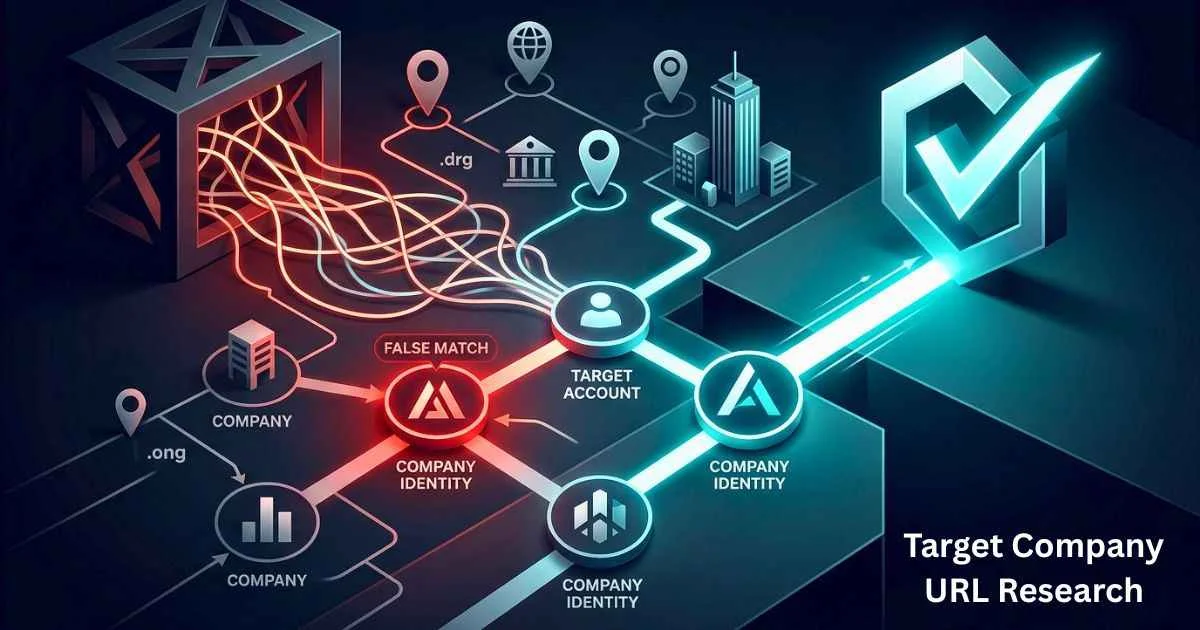
You likely found the right company URL when the website matches the target company’s name, industry, location, products or services, and overall business identity. A company name or domain match alone is not enough to confirm it.
This is the key part of target company URL research. Finding a company website is easy. The real task is making sure the website belongs to the exact company you want to research.
A similar company name, parent company, subsidiary, old domain, brand website, or regional site can lead you to the wrong business. If that happens, the company data you collect for sales research or account research may also be about the wrong company.
Quick answer: How do you know you found the right company?
Check the company name, industry, location, products or services, and business identity. Also check whether the website belongs to the target company itself or to a parent company, subsidiary, brand, or another related business.
If these details point to the same business, you have a much stronger company URL match. If they do not, do not treat the URL as confirmed.
The rest of this guide explains how to find the right company website, verify the URL, handle difficult matches, and use the verified website for deeper company and sales research.
What Is Target Company URL Research?
Target company URL research is the process of finding a company website and checking that it belongs to the specific business you want to research.
The goal is not simply to find a domain. It is to connect a company name or target account to the correct web identity.
For example, you may start with a company name from a sales list. You may also have its location, industry, LinkedIn profile, or other company details. You then need to find the website that matches those details.
This makes company URL research different from a basic company name search.
A name helps you find possible businesses. A verified URL gives you a stronger starting point for company research.
Why the First Company URL You Find May Be Wrong
The first search result is not always the right answer.
A company name may be shared by several businesses. Some companies also have complex structures, old domains, different brands, or regional websites. These cases can make a company URL lookup less simple than it first appears.
Similar company names
Two businesses can have very similar names while having no connection to each other.
For example, “Bright Data Systems” could refer to different businesses in different industries or locations.
A search for the name alone may return several possible websites. The first one may look correct because the name is similar. Look at the business behind the website before accepting the URL. Its industry, location, products, and company description should make sense for your target.
This is why finding a company website by name should be treated as the start of the process, not the final step.
Parent company and subsidiary confusion
A target business may belong to a larger company group. You may search for the subsidiary and find the parent company’s website. You may also find a subsidiary when your target is the parent company.
The relationship matters because the two entities may have different products, teams, locations, websites, and business operations. If your goal is sales research, this can also affect which account and decision-makers you should study.
Before using the URL, make sure you know which company or business unit your research is about.
Rebrands and old company URLs
A business may change its name or brand over time.
An old domain can still appear in company directories, older articles, saved databases, or other online records. The domain may redirect to a newer website, or it may no longer represent the current business.
Do not assume that an old URL is the current official company website.
Check the company’s current name and brand, then look for a clear connection between the old and current identity.
Regional and country websites
A company may serve several countries and use different websites or regional sections.
For example, a business may have a main .com website and country-specific domains or pages.
The best URL depends on your research goal. If you are studying a specific country operation, the regional website may contain information that is more relevant to that market.
The important thing is to understand what the URL represents before adding it to your research record.
Corporate, brand, and product websites
A company can own several websites. One may represent the main company. Another may focus on a product. A separate site may represent a brand owned by the company.
All of these sites can be real, but they do not always represent the same level of the business.
If you are researching the whole company, identify the main corporate or company website where possible.
If you are researching a specific product or brand, its dedicated website may be useful as a second source.
How to Find the Right Target Company URL
Start with the information you already have about the target.
If you know only the company name, search for the exact name. If the name is common, add another detail such as the location, industry, product, or country.
For example:
Company name + city
or
Company name + industry
This can narrow the results before you even open a website.
But search results only give you possible matches. You still need to verify the company behind the URL.
Start with company identity
Compare the search result with the company information you already have. Look at the business name, industry, location, products, services, and brand.
A strong match should tell the same basic story across these details. If the company name matches but the industry is completely different, you may have found another business with a similar name.
Check the website itself
Open the possible website instead of relying only on the search result.
Start with the homepage. Then check pages such as About, Contact, Products, Services, or other company information pages.
The About page may explain the business and its history. The Contact page may show locations. Other pages can show what the company sells and which markets it serves.
The goal is to confirm that the website describes the same business you intended to find.
Check the business identity in more than one place
When a match is unclear, compare the website with other reliable company information.
For example, you may compare the website with a company profile, business directory, professional network profile, or other source that identifies the business.
You are not looking for every detail to be identical. You are looking for a consistent company identity.
If several sources describe the same name, industry, location, products, and brand, your confidence in the URL is stronger.
How to Verify a Company URL
Finding a possible URL is only half the job. Before using it for company research, check whether the website really belongs to the target business.
1. Check the company name
Start with the name shown on the website. The website name does not always have to be identical to the legal company name. A business may use a shorter brand name, an abbreviation, or a different trading name.
What matters is the connection between the website and the company you are researching. If the name is different, look for information that explains the relationship.
2. Check the domain
Look at the domain, but do not judge it by the name alone. A company may use a short or branded domain that does not contain its full legal name.
For example, a business called “Example Technology Holdings” might use a shorter brand domain.
The domain becomes more useful when the website content confirms the company identity.
3. Check the industry
Read what the business does. Does the website offer the products or services associated with your target company?
Industry is a strong way to separate similar company names. If one business sells software and another sells industrial equipment, a matching company name does not make their websites interchangeable.
4. Check the location
Look for the company’s country, city, office, or market. Location can help separate businesses with similar names. It can also help you choose between a global website and a regional website.
A location mismatch does not always mean the URL is wrong. The company may have several offices or operate in several markets.
The key is to understand why the locations differ.
5. Check the business identity
Finally, look at the full picture. Do the website, company profile, brand, products, location, and business description point to the same organization?
The more signals that agree, the stronger your URL verification.
You do not need one perfect signal. You need enough consistent evidence to avoid a weak or incorrect match.
A Simple Right-Company Test
When you are unsure about a company URL, ask five questions:
Is this the same company name?
Is this the same type of business?
Is the location or market consistent?
Do the products or services match?
Is this the target company, rather than a parent, subsidiary, brand, or unrelated business?
If the answers are mostly yes, the URL is a strong candidate.
If two or more important details do not match, pause before using the URL.
This simple check can reduce the risk of building your research around the wrong company.
What If the Company Name and Website Name Are Different?
This is a common point of confusion.
The name on a website may be a brand rather than the company’s legal name. A company may also trade under a different name from the one used in business records. For this reason, an exact text match is not always required.
Instead, look for a clear relationship. For example, the website may mention the legal company name in its company information while using a shorter brand name across the site.
The same company may also appear under a parent organization or another registered business name.
The important question is:
Can you clearly connect the website to the company you intended to research?
If the answer is unclear, mark the URL for further review instead of treating it as confirmed.
What If the Company Has Multiple Websites?
Multiple websites do not automatically mean that one of them is wrong. A company may have a main corporate site and separate websites for brands, products, countries, or business units.
The correct target company URL depends on what you need to research. If you need company-level information, start with the main company website. If you need product information, a product site may be more useful. If you need information about a local operation, a regional website may be the better source.
In a research database, it can also help to keep the main company URL separate from related URLs. This prevents a product or brand domain from being mistaken for the company’s main website.
Why URL Verification Matters for Sales Research
A company URL often becomes the starting point for deeper account research. A sales researcher may use the website to understand the company’s products, market, locations, business model, and current priorities before researching people or preparing outreach. That makes the first URL an important data point.
Imagine finding a company with a similar name and using its website as your target account. You could then collect information about its products, employees, locations, leadership, and business activity. The research might look detailed and useful.
But if the website belongs to another business, the entire account profile can be built around the wrong company. That is why target company URL sales research should include URL verification before deeper enrichment.
What to Research After You Verify the Company URL
Once you confirm the company website, you can move from URL lookup to deeper research. Start by understanding the company’s core business. Read its main product and service pages. Look at the markets it serves and the problems its products solve.
Then look at company-level information that fits your research goal. For sales research, you may want to understand the company’s business focus, locations, products, leadership, hiring activity, technology, partnerships, or recent changes.
For market research, you may focus more on products, competitors, business segments, markets, and company developments.
The URL is not the research itself. It is the verified starting point that helps you research the correct business.
Target Company URL Research for Account Lists
Company URL research becomes especially useful when building a target account list. A list may begin with company names, but names alone can create duplicate or incorrect matches. Adding a verified website can make each account easier to identify.
For example, these two records are not equally useful:
Company: Bright Solutions
URL: brightsolutions.com
versus:
Company: Bright Solutions
URL: brightsolutions.com
Status: Verified against industry and location
The second record tells you more about the quality of the match.
For larger lists, keeping company name, website, location, industry, and verification status together can make later account research easier.
Common Company URL Research Mistakes
One common mistake is accepting the first search result without checking the business behind it. A company name alone may not be enough because different businesses can have similar names.
Parent companies and subsidiaries can also create wrong matches. A related company may look correct while representing a different business entity.
Old domains are another source of bad data. A URL may have been correct in the past but may no longer be the company’s current website.
It is also easy to confuse a brand or product website with the main company website. These sites may be related, but they do not always represent the same business.
Finally, avoid treating one matching detail as final proof. A stronger company URL match comes from several consistent signals, such as the company name, industry, location, products, and business identity.
Can Target Company URL Research Be Automated?
Manual research works well for a small number of companies. But the task becomes more difficult when a sales or research team needs to process a large account list. For every company, the workflow may involve finding a possible website, checking the company identity, comparing information, and saving the URL.
Automation can reduce some of this repeated work. A larger workflow may look like:
Company list → URL discovery → company matching → verification → company data
The goal of automation should not be only to find more domains. It should also help separate clear matches from uncertain ones.
When a company name is common, the match is unclear, or the company has a complex structure, human review may still be useful before the URL is treated as confirmed.
A Practical Company URL Research Workflow
For everyday research, keep the process simple:
- Start with the target company name.
- Add the location or industry if the name is not unique.
- Find one or more possible company websites.
- Open the website and check the company’s business identity.
- Compare the name, industry, location, products, and brand.
- Check the company structure to make sure the URL belongs to the target company, rather than a parent company, subsidiary, brand, or regional operation.
- Confirm that the website is current enough for your research purpose.
- Save the verified URL with the company record.
This creates a clear path from company URL lookup to useful company research without treating an unverified domain as fact.
Frequently Asked Questions
What is target company URL research?
Target company URL research is the process of finding a company’s website and verifying that it belongs to the specific business you want to research. It combines URL discovery with company identity checks.
How do I know if I found the right company URL?
Check the company name, industry, location, products or services, and overall business identity. Also confirm that the URL belongs to the target company rather than a parent, subsidiary, brand, or unrelated business.
How do I find a company’s official website by name?
Search the exact company name first. If the name is common, add its location, industry, country, or another useful detail. Then open the possible website and verify the business before treating it as the official company website.
What should I check when verifying a company URL?
Check the company name, domain, industry, location, products or services, brand, and company structure. Several matching signals provide stronger evidence than one name match.
What if the company name does not match the website?
The website may use a brand name, trading name, abbreviation, or another name connected to the legal company. Look for clear evidence that the website and target company are part of the same business.
What if a company has more than one website?
Identify what each website represents. One may be the corporate website, while others may belong to a product, brand, subsidiary, or region. Use the URL that matches your research goal.
Why does URL verification matter in sales research?
A wrong URL can lead to research about the wrong business. Verifying the company website first gives account research and sales prospecting a stronger starting point.
Can company URL research be automated?
Some parts of the process can be automated, especially URL discovery, matching, and data collection. Unclear company matches may still need review before the URL is treated as confirmed.
Final Takeaway
The right company URL is not simply the first website that appears in search. It is the website that can be connected to the exact business you want to research.
Check the company name, industry, location, products or services, business identity, and company structure before you trust the URL.
Once the match is clear, you can use the verified website as a starting point for company research, account research, and sales prospecting.
Find the URL. Verify the company. Then research with confidence.
You Might Also Like:
QuikConsole com Explained: What’s Confirmed, What’s Claimed, and What’s Unclear
FundFireInsight.com Explained: What the Website Actually Is

Hi, I’m Emma Rose, the creative founder of Punstation.com. With a background in crafting hundreds of engaging guides and clever wordplay, I specialize in making complex information easy and fun to digest. Whether I’m exploring technical trends, lifestyle ideas, or creating my signature witty puns, my goal is to provide useful, well-researched content that helps solve problems and brings a smile to your face. For me, every topic, from tech to humor, is an opportunity to share clear, practical insights with a fresh perspective.